

Nowadays, you would hardly find someone who does not use Microsoft Excel. From school students to engineers to investors, everybody is dependent on Excel to do their data sorting and calculations. To cater to this wide base of users, a dedicated interface to Excel was developed in Iliad. This is a simple yet powerful linkage that allows for coupling the diverse fleet of OmniQuest exploration and optimization engines to your datasheets. This coupling enables a variety of applications including creating a personal schedule, evaluating different financial strategies, automating repetitive tasks, and creating colorful visualizations of complex solutions. The Excel interface can do it all. To read in your data, all you need to do is define the variables and then specify their location in the selected Excel spreadsheet (Sheet number, row number and, column number). And the data is not limited to single cells. You could read an entire table by simply specifying its size (number of rows and number of columns) and starting location (Sheet number, row number and, column number). And lo and behold! Your data is imported into Iliad and ready for any operation you choose.
Let us consider the following example, which involves minimizing the cost of making a cardboard box. We have 3 variables that we can change, i.e., Height (H), Width(W), and Breadth (D). We have set up our Excel sheet to take these values and calculate two outputs, Surface Area (A) and Volume (V) (see below).
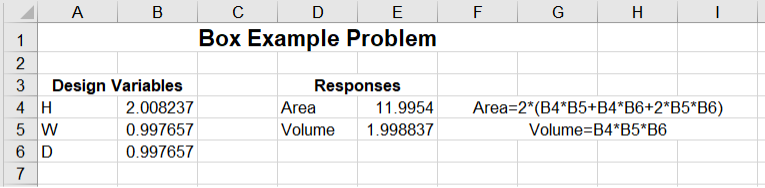
This is our starting point. Next, we create an optimization workflow inside Iliad using the Excel component.
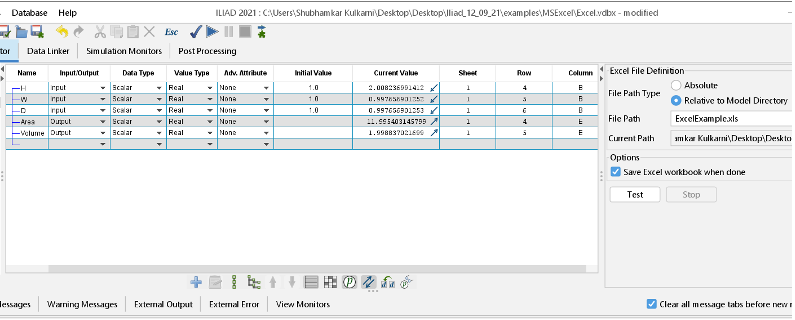
We first select the desired Excel spreadsheet. Next, we specify the locations of each variable. For example, ‘H’ is located at (Sheet number 1, Row number 4, and Column B). This procedure is repeated for all the input and output variables. From here, we set up and run the optimization problem as usual. It is as simple as that!
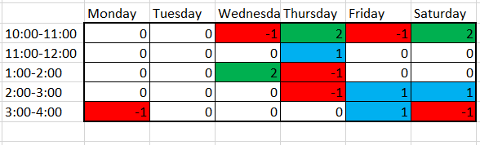
Here is an example of Iliad and Excel used for creating an optimized schedule. Starting with a blank schedule and a list of meetings, personal tasks, and deadlines, a conflict-free schedule is created. Moreover, the solution is color-coded for convenience.

The possibilities with the Iliad-Excel coupling are endless. Contact us today to see the power Iliad can bring to your organization!