

In this week’s blog, we continue with design of experiments (DOE) component. In last week’s installment, we saw how the DOE component can generate designs for efficiently exploring the design space. Today, we will see how the DOE component can automate design evaluations.
Let’s say we have a design generated by DOE. Now, we need to evaluate the responses for each of the points in the design. If this process is experimental, then the user will evaluate them physically. But let’s say that instead, we have mathematical equations in the form of a script or simulation to evaluate the responses. Then, we essentially need to run the script or simulation for each design point and store the responses. This process can be automated using the DOE component. To do that, we select the ‘Create DOE points with responses’ radio button.

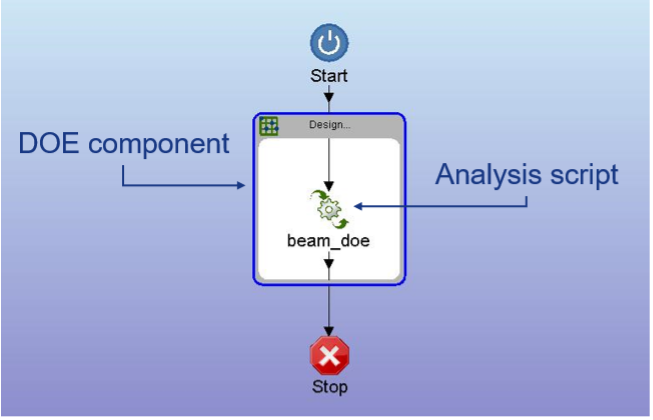
In the case of the beam example, we have a script (beam_doe) that calculates the volume and deformation, given the cross-sectional dimensions of the three sections of the beam. We need to house this script inside the DOE component and click on the ‘Extract Inner Component Data’ button and that’s it. The DOE component will handle the rest.
For the beam example, let’s say we create a design using two input variables (H, W) and then evaluate the two responses (V, D) for each design point. The flow chart would look something like this:
The execution of this model can be better understood through the graphic below:
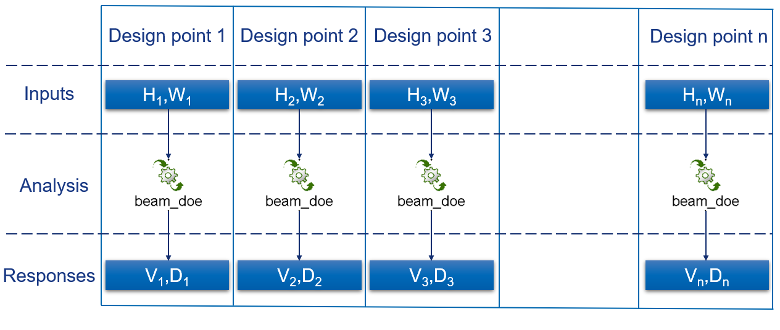
Since the execution of each design point is independent of others, several can be evaluated at a time using parallel computation, thereby speeding up the evaluation process. Furthermore, multiple components can be housed inside the DOE to create ‘evaluation chains’ for multi-domain analysis. And since the execution process is automatic, the user only needs to set up the model and run it and Iliad will do the rest for them!
That’ all for this week folks. See you next week with another exciting topic!