

by Juan Pablo Leiva, OmniQuest™ President
Have you ever asked yourself what your designs might be like if you had the opportunity to make your constraints tighter or looser? In the process of automatically pursuing the potential perfection of your design, Genesis® automatically produces analysis data that enables a designer to perform trade-off assessments to explore new possibilities. Most Computer-Aided Engineering (CAE) tools work within the designer’s-imposed constraints driving toward optimization. Unlike most every other CAE offering, Genesis® guided design synthesis enables the designer to conduct sensitivity analyses testing the effect that changes in one or more constraints would have on the optimized design characteristics.
The following example illustrates this “What-if?” capability:
In this example, the objective is to maximize the torsional stiffness of a car body for a defined load. This can be expressed as minimizing the internal strain energy which is directly proportional to the load times displacement. With a constant load, lower strain energy means a smaller displacement, therefore a stiffer structure. This problem uses 51 design variables.
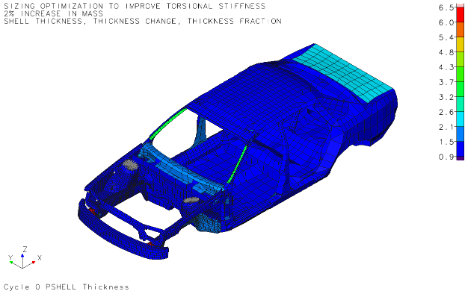
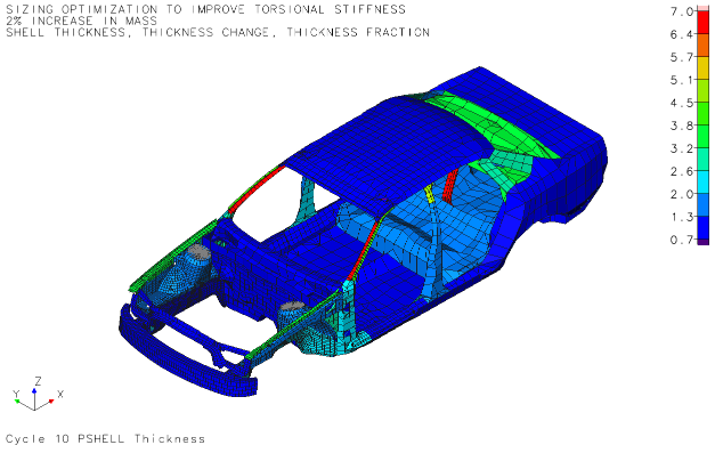
Figure 1 shows the initial design, while Figure 2 shows the final design. The colors in the pictures are the thicknesses of the
parts, which were the design variables. In the final design, GENESIS has successfully reduced the strain energy from 62.44 to 32.04. The mass in final design is active at the bound value of 300 kg.
Trade-off study: We would like to learn what will be the impact on the objective if we were allowed to use 3 more kg (1%) of mass?
Genesis® can output the sensitivities and Lagrange multipliers that are used to calculate optimal sensitivities, which are sensitivities at the optimal point. The Lagrange multipliers allow us to estimate the change of the objective due to a change of constraint bounds. Note that Lagrange multipliers only exist for active constraints.
With the aid of a simple Lua script, Genesis® will automatically generate a spreadsheet with the following chart:
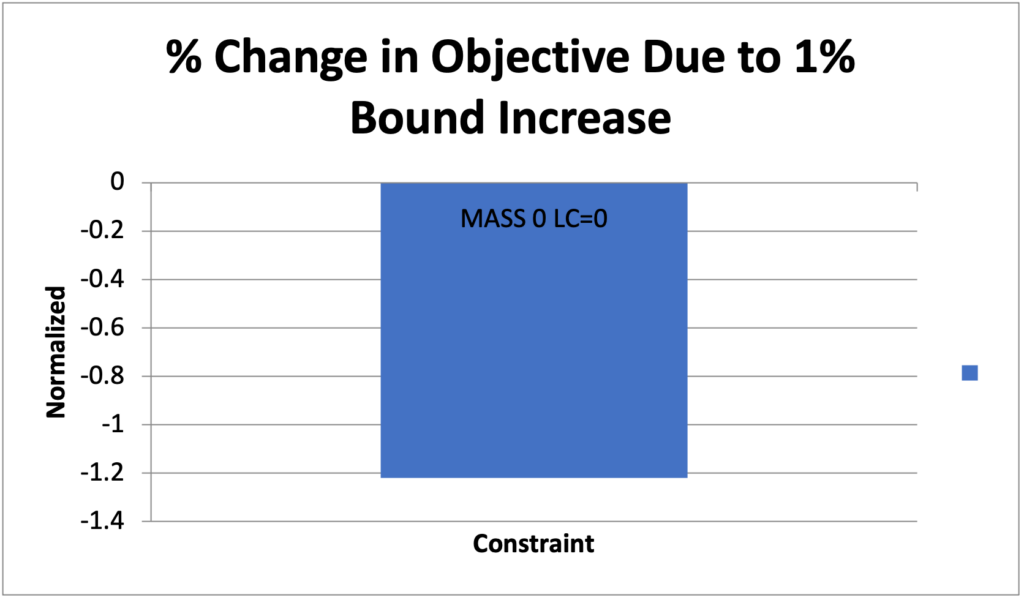
The above diagram reflects the sensitivity of the Objective to the change in Constraint; specifically, that an increase in normalized bounds of 1%, results in a reduction by 1.22% of the normalized objective. In other words, without rerunning the optimization analysis, we learn that a 1% increase in mass will make the design 1.22% stiffer (as the strain energy will be 1.22% lower).
By default, the generated spreadsheet will also provide values for the estimated new objective achieved through each of the iterations of % change in constraint. In this example, in addition to the 1% mass increase, we would also like to estimate the 3% and 5% changes in the bounds of 309kg and 315kg. To verify the estimates, we run GENESIS with the modified bounds and record the results in the next table:
| Bound [kg] | GENESIS Optimized Base Value | Estimated Objective [N-mm] | GENESIS Optimization Verification run | Error of Approximation |
| Original 300 | 32.039 | |||
| 1% higher 303 | 31.648 | 31.556 | 0.3% | |
| 3% higher 306 | 30.866 | 30.602 | 0.9% | |
| 5% higher 315 | 30.084 | 29.735 | 1.2% |
Conclusion: Genesis® enables rapid sensitivity analyses to evaluate the overall design robustness without the need for multiple, redundant execution of optimization analyses. A rerun of the full optimization analyses with successively updated 1%, 3%, and 5% changes in the mass constraint confirming the accuracy of the sensitivity analysis.
Note: Please also see Genesis® Design Studio example problem SZDSG012 which provides an example similar to the above and using multiple concurrent constraint bounds.